
Who is working now
- Paper, spreadsheets, WhatsApp
- Call everyone
- Plain clock-in system
- A list of punches
- fluo
- Live view with a map
The full feature list of the coordinator panel and the worker app. No modules to buy halfway through the year.
The bedrock the rest of the system rests on.
One button on the phone, full timestamp and location stamp.
Shifts with flexible completion windows billed on actual time, without false tardiness alerts.
Recording physical presence duration within site boundaries via geofencing.
Counted separately and visible on the day axis, not blended into work.
Several sites in one day form one shift made of multiple sessions.
Event times come from the worker's phone. Nobody, including the business owner, can edit them later.
Requests from the phone, decisions from the dashboard, cover in the rota.
The panel flags a late start ten minutes after the planned time, and the report totals late minutes for the period.
As much as proof requires, and not a minute more.
Every active worker on one map.
The phone detects site arrivals and departures in the background, prompting shift start and completion.
The full trail, replayable when something needs explaining.
The app works out which site the worker is on by itself.
Collection continues with the screen locked.
Once “Stop” is pressed, location collection ends.
What turns finished work into proof.
Assigned to a site and a person, with a deadline and a priority.
Standing work scopes and checklists permanently pinned to the property.
Repeating work generates itself in the schedule.
The coordinator signs off or sends it back with a comment.
Pinned to task, site and time, ready for the report.
Faults, shortages and hazards reported from the phone, with a photo.
The scope of work appears on the phone on arrival.
Rota, people and places in one place.
Week and month views by people or sites, with week copying.
Clone any site along with teams, workers, contacts, and stock in one click.
Strict visibility and scheduling restricted only to assigned workers.
Address, entry codes, contact, scope of work and stock levels.
Sites grouped by client or by team.
Accounts, rates, status, last login, work history.
The owner creates coordinators and can narrow each one's view to selected sites, crews and people — 30 sites, 30 coordinators, each seeing only their own.
Cleaning supply levels per site with a low-stock threshold.
Conversations that stay with the company.
Direct conversation with a worker, with message replies.
Channels for teams and client groups.
To everyone, to a group or to one person.
Message content encrypted in the database.
Eight ready documents in three formats.
Hours and rates ready for accounting.
A document for the client with photos of completed work.
Labour cost per site against contract value.
Who starts on time and who closes tasks on time.
A link for the property manager showing completed work.
PDF to send, XLSX to analyse, CSV to import.
Enterprise protection for your people and your company data.
Dedicated safety protection for staff working in isolation or on night shifts.
Instant emergency callout from the phone triggering sirens and map focus in the dashboard.
Routine safety confirmations with automatic escalation if a worker misses contact.
No passwords. The coordinator shows a code on site or emails a link. Revoking it cuts access.
Owner, coordinator, worker, client — each sees their own.
Who changed what and when.
Your data is separated at the database level.
Daily database backup with retention.
Processing compliant with GDPR.
The more sites you take on, the more of your day goes into chasing information. Not because people work badly. Because nothing records itself.
Ten calls a day to establish something the worker's phone already knows. Each one pulls you out of whatever you were doing.
One word against another on payday. You can't prove either version, so you pay.
You pick up and you genuinely don't know whether anyone did. By the time you find out, the client is angry and you've lost half an hour.
Hours copied from notes, from texts, from memory. Closing the month costs you two evenings with a calculator and a phone.
Your only proof of work is somewhere in a group chat from three weeks ago. Good luck finding it when a complaint lands.
Forty minutes in the car to see something you should be able to see from the office. Fuel, time, and no more certainty than before.
All of it has a price. Let's put a number on it.
Pick a date range and a report type. Everything is calculated from data that recorded itself while the work was happening.
Hours and rates per worker, ready for the accountant.
What happened on a given day across every site.
A document for the property manager: completed work with photos.
Who starts on time and who is consistently late.
Tasks closed on time, broken down by person and site.
Labour cost per site against contract value.
One file covering a client or a team.
Every photo from the period, captioned and timestamped.
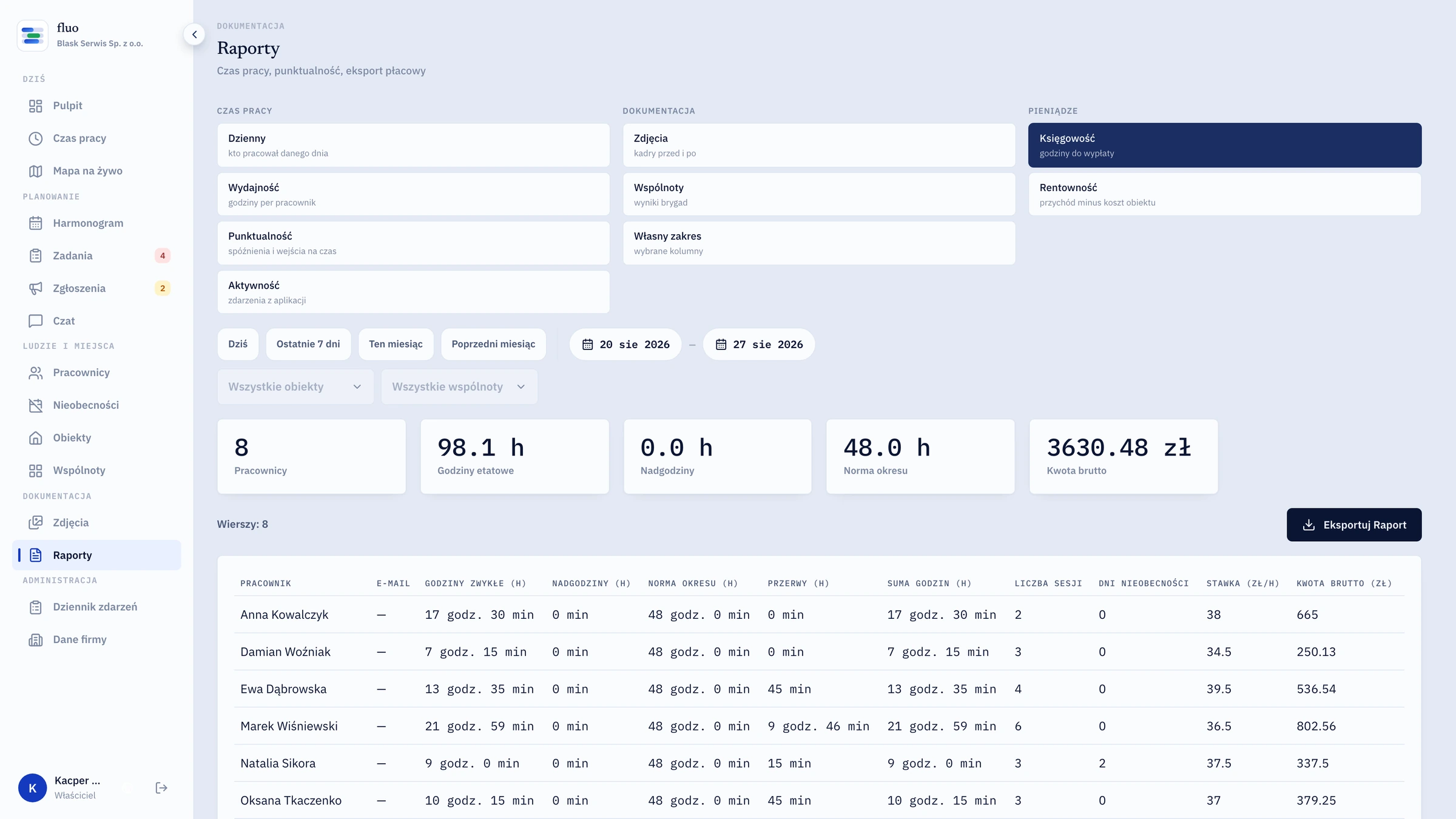
Email a report to several recipients at once or share it with the client by link, with no account for them to create. You pick the document language at export — Polish, English, Ukrainian, German, Czech or Slovak.
This isn't a feature for you. It's the argument that wins tenders with property managers.
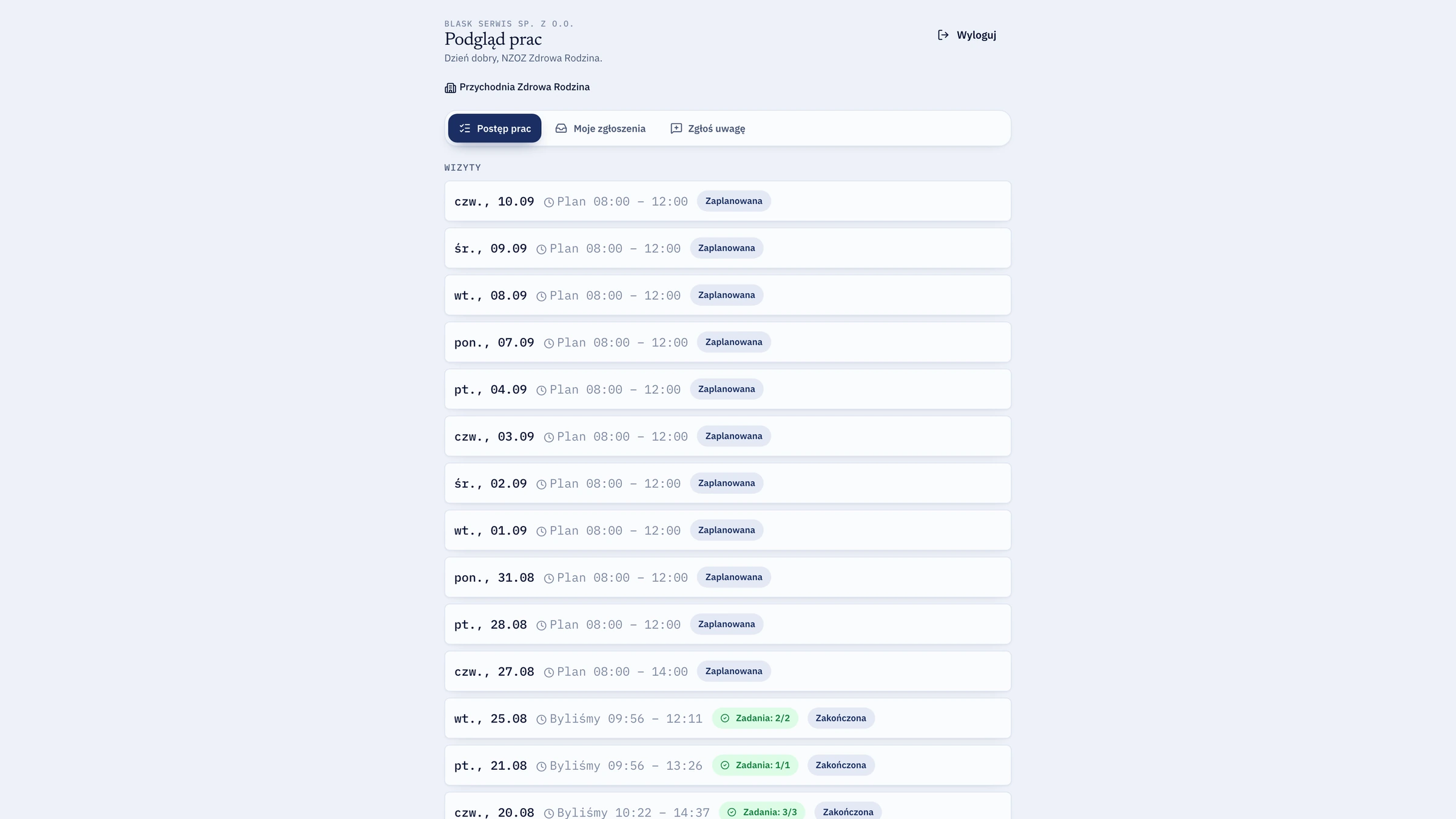
Three ways of running the same company. The difference is what is left once the shift ends.
No sales deck. We show you the panel on data like yours and tell you straight whether it adds up for you.